


Download Movie Edit Touch 2 – Simple Video Editor for Windows 8
Overview
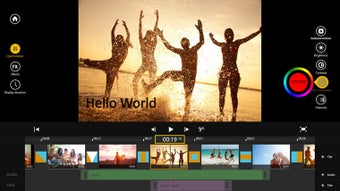
Movie Edit Touch 2 is a lightweight yet surprisingly capable video‑editing application built specifically for the Windows 8 ecosystem. It targets users who capture home movies on a tablet or a laptop and want to turn raw footage into a polished clip without the steep learning curve of professional‑grade editors. The interface is deliberately clean: large, touch‑friendly icons sit on a dark canvas, making it easy to trim clips, splice scenes, and add basic visual effects with just a few taps.
While the feature set is intentionally modest—primarily trimming, simple transitions, title overlays, and a handful of color filters—it excels at speed and immediacy. Users can import video directly from the device’s camera roll, drop in photos to create slideshow‑style videos, and publish the final product straight to YouTube or save it locally for later sharing. Because it runs natively on Windows 8, the app benefits from hardware acceleration, ensuring smooth playback even on modest tablets.
Whether you’re a parent stitching together birthday moments, a teacher assembling a quick lesson recap, or a content creator needing a fast‑track solution for on‑the‑go edits, Movie Edit Touch 2 offers a secure, free, and frictionless experience that feels right at home on modern touch devices.
Key Features and How to Get Started
Core Feature List
- Intuitive touch‑first interface designed for Windows 8 tablets.
- Fast video trimming and cutting with frame‑accurate controls.
- Simple transition effects (fade, slide, wipe) for smoother scene changes.
- Title and caption overlays with customizable fonts and colors.
- Basic color correction filters (brightness, contrast, saturation).
- Photo‑to‑video slideshow creator with music track support.
- One‑click export to popular formats (MP4, WMV) and direct YouTube upload.
- Automatic project saving and cloud sync for easy continuation across devices.
Installation & Usage Instructions
Getting Movie Edit Touch 2 up and running is a breeze. First, visit the Microsoft Store on your Windows 8 device and search for “Movie Edit Touch 2.” Click the Get button; the app is free and the download size is under 80 MB, making it ideal for limited bandwidth scenarios. Once installed, launch the app from the Start screen.
The welcome screen offers two primary entry points: New Project for a fresh edit, or Open Project to resume previous work. Import your footage by tapping the + Add Media button and selecting videos or photos from the device’s library, a connected camera, or a cloud folder (OneDrive, Dropbox). After the media appears on the timeline, you can drag the ends of each clip to trim, split a clip by placing the playhead and hitting the scissors icon, or reorder clips by dragging them along the track.
Adding effects is equally straightforward. Tap a clip, then choose Effects from the bottom toolbar. A carousel of transitions, filters, and title templates appears; simply preview each option and tap to apply.
For titles, select Add Title, type your text, and adjust size, color, and placement using pinch‑to‑zoom gestures. When your edit is complete, hit the Export button. Choose the desired resolution (720p for quick uploads, 1080p for higher quality), select a destination folder, or click the YouTube icon to log in and publish instantly.
The app automatically renders the video, displaying a progress bar and estimated completion time. Within minutes, you’ll have a ready‑to‑share video without ever leaving the Windows 8 environment.
Compatibility, Pros & Cons
Supported Operating Systems
Movie Edit Touch 2 is built exclusively for the Windows 8 family, including Windows 8, Windows 8.1, and Windows 10 devices that retain the Windows 8 Store infrastructure. It runs natively on both x86 and ARM‑based tablets, taking advantage of touch input, stylus support, and hardware‑accelerated video decoding. While the app is not available for macOS, Android, or iOS, its Windows‑only focus ensures a highly optimized experience for users who rely on Microsoft’s tablet ecosystem for video capture.
Pros
- Fast, touch‑friendly UI that requires virtually no learning curve.
- Zero‑cost download with no hidden in‑app purchases.
- Direct YouTube integration saves time for creators who want instant publishing.
- Lightweight footprint; runs smoothly on older Windows 8 tablets.
- Automatic project backups reduce the risk of losing work.
Cons
- Limited to basic editing; advanced users will miss multi‑track timelines and keyframe animation.
- No support for Windows 11 or newer store APIs (requires legacy Windows 8 store).
- Export options are restricted to MP4 and WMV; no HEVC or MOV support.
- Lacks built‑in audio editing tools such as multi‑track mixing or voice‑over recording.
- Occasional UI lag when handling very large video files (>2 GB).
Frequently Asked Questions
Is Movie Edit Touch 2 completely free?
Yes, the app can be downloaded from the Microsoft Store at no cost and includes all core features without requiring in‑app purchases.
Can I edit videos recorded on a smartphone?
Absolutely. Transfer the video files to your Windows 8 device via USB, OneDrive, or a micro‑SD card, then import them into Movie Edit Touch 2 for editing.
What video formats are supported for import?
The editor accepts MP4, WMV, AVI, and MOV files, though MOV files may be transcoded during import on older hardware.
How does the direct YouTube upload work?
When you click the YouTube icon in the Export dialog, you’ll be prompted to sign in with your Google account. After authentication, you can add a title, description, and tags before publishing the video directly from the app.
Is there any way to add background music to a slideshow?
Yes. In the slideshow mode, tap the music note icon to import an audio track from your library. The app will automatically sync the music length to the duration of the photo sequence, with basic fade‑in/out controls.
Conclusion & Call to Action
Movie Edit Touch 2 fills a niche that many larger video‑editing suites overlook: a fast, secure, and free solution for everyday Windows 8 users who want to polish home movies or quick slideshows without a steep learning curve. Its touch‑optimized design, one‑click YouTube upload, and lightweight footprint make it an excellent choice for families, educators, and casual creators. While power users may outgrow its basic toolset, the app delivers exactly what it promises—simple editing that works right where you record. If you’re ready to transform your raw clips into share‑worthy videos in minutes, click the download button below and start editing today.
$0.00 – Download Movie Edit Touch 2 now
Movie Edit Touch 2 offers a surprisingly robust set of features for a free Windows 8 app. Its strength lies in its simplicity and direct YouTube integration, making it perfect for quick projects. While it lacks advanced multi‑track editing, it does exactly what it promises—basic trimming, effects, and titles—without any clutter.







